Friday, April 27, 2012

The Ethics of Documentary Film

In terms of ethics in the film industry, the area where most ethical issues arise is in the genre of documentary filmmaking. The point of a documentary is to capture reality; real people in real situations. The line between real and fake in a documentary is sometimes a blurry one.

Documentaries can come under fire for their ethics, or lack thereof, in numerous ways. A subject could end up being portrayed in a way that embarrasses or humiliates him or her. They could be misrepresented. Some aspects of certain events could be fabricated for the sake of a little extra drama or excitement. Some facts may end up not being verified. There are times when filmmakers fall into the trap of entertainment.

However, there are many companies, such as PBS, Discovery, and National Geographic, among others, who often ask the filmmakers they hire to observe certain standards when it comes to ethics.  They often follow codes of ethics that were written for journalists, because that is essentially what they are.

One prime example of an unethical documentary is the 1922 silent documentary, Nanook of the North by Robert J. Flaherty. The film captures the life and struggles of an Inuit man named Nanook and his family, living in the Arctic. While it has been considered a ground-breaker for the documentary genre, it has had its share of controversy surrounding it.

Promotional image of Nanook of the North (1922).

First of all, Nanook was not actually named Nanook. His real name was Allakariallak and the woman portrayed as his wife was not his actual wife, but a common-law wife along with another woman. During hunting scenes, Nanook was encouraged to hunt in a more primitive manner, when he usually used a gun. Flaherty also exaggerated his portrayal of the Inuit people he filmed in order to give them a more primitive feel, making it seem as if their lives were in more danger than they actually were.

Another controversy involved the staging of two scenes, one of which involves Nanook hunting a walrus, which the Inuit people no longer did, though Flaherty chose to do it anyway in order to give the film a dramatic event. The other staged scene involved Nanook visiting a trading post and being shown a gramophone by a white man. The man allows Nanook to hold and inspect the record and Nanook then bites it. Flaherty meant for it to serve as comic relief, though Nanook knew what a gramophone was. Flaherty defended his film, saying that a filmmaker must sometimes distort some aspects of his or her film in order to catch its “true spirit.”

A version of a documentarian’s code of ethics states that a documentary should “document the subject in a way consistent with actual events. The final product should be a representation of the truth.”

While I do believe that Flaherty was not entirely ethical in how he portrayed the subjects in this film, there is some accuracy to the events in it. The Inuit people may not have been hunting walrus with spears or wearing the clothing of their ancestors at that time, but at one point in history, they did. I do accept that Flaherty wanted to capture the Inuit people in the way they were before exposure to European civilization and culture, but at the same time he made those people, who were aware of certain things about our culture in 1922 and turned them into something of a cliché.

While it seems like Flaherty was at least being honest with the people he filmed about the kinds of things he was going to have them do and wear in the film, I think he should have captured them as they were in 1922, not as they were decades before. Portraying a man as a cliché of his culture for entertainment is unethical, though I am not sure of the ethical standards that existed in 1922 because the documentary was  a very new genre at the time.

Monday, April 9, 2012

Editing via YouTube

One way for filmmakers to get their work out to the public is to post it on the internet through a website such as Vimeo or YouTube. I myself have a few of my early film projects posted on YouTube. 

YouTube has given its video uploading service a major boost by adding an editing feature to it. Last year, the website added a video editor that allows users to give their videos a few very basic touch ups, such as color correction and stabilizing shots that may be a little too shaky. It also allows users to change their video from color to black and white or give the video a vintage film look. Earlier this year, YouTube updated it by adding a "one-click" feature that allows users to color correct an underexposed (not well-lit) video and stabilize a shaky video, along with trimming the ends of clips and putting multiple clips together into one video.


YouTube's Video Editor - Optioning color correction for underexposed videos.

The following video also gives a brief explanation about what this new internet feature does for YouTube users.


Again, while this is a very basic new tool, it is something of a revolutionary technology being introduced to the video editing world. It has the power to compete with professional editing software such as Apple's Final Cut Pro and Adobe's Premiere, should YouTube choose to add more specific features to it in the future. What makes it different from those professional editing suites is that it is available to YouTube users for free, as opposed to spending hundreds of dollars on Final Cut Pro. Though, at this moment it is not quite on par with a software such as Windows Movie Maker or iMovie. 

This is a way for YouTube to enhance the quality of the videos that are uploaded to the site. While some videos that users upload are quite decently professional-looking, there are some uploaded videos with very poor picture quality, such as those shot on cell phones. It seems like a nice idea for amateur video makers who would like their videos to look a little better, though I don't think it's something that film students or professional filmmakers would find useful just because it is so basic compared to the many features of professional editing suites that we/they are used to. However, this new YouTube feature seems to have potential to grow into something a little more extensive.

Sunday, April 1, 2012

Review: Final Cut Pro X

Film editing technology is constantly changing. Companies that create editing software, such as Apple and Adobe, are always setting the bar against each other with new features to their editing softwares. Editors desire software that allows them to organize their footage and clips as they want, be able to control the formatting of the videos they import and export, be able to edit together clips from different camera; the list goes on. Essentially, editors desire software that makes their job as not complicated as possible while working in a world where technology is advancing so quickly.

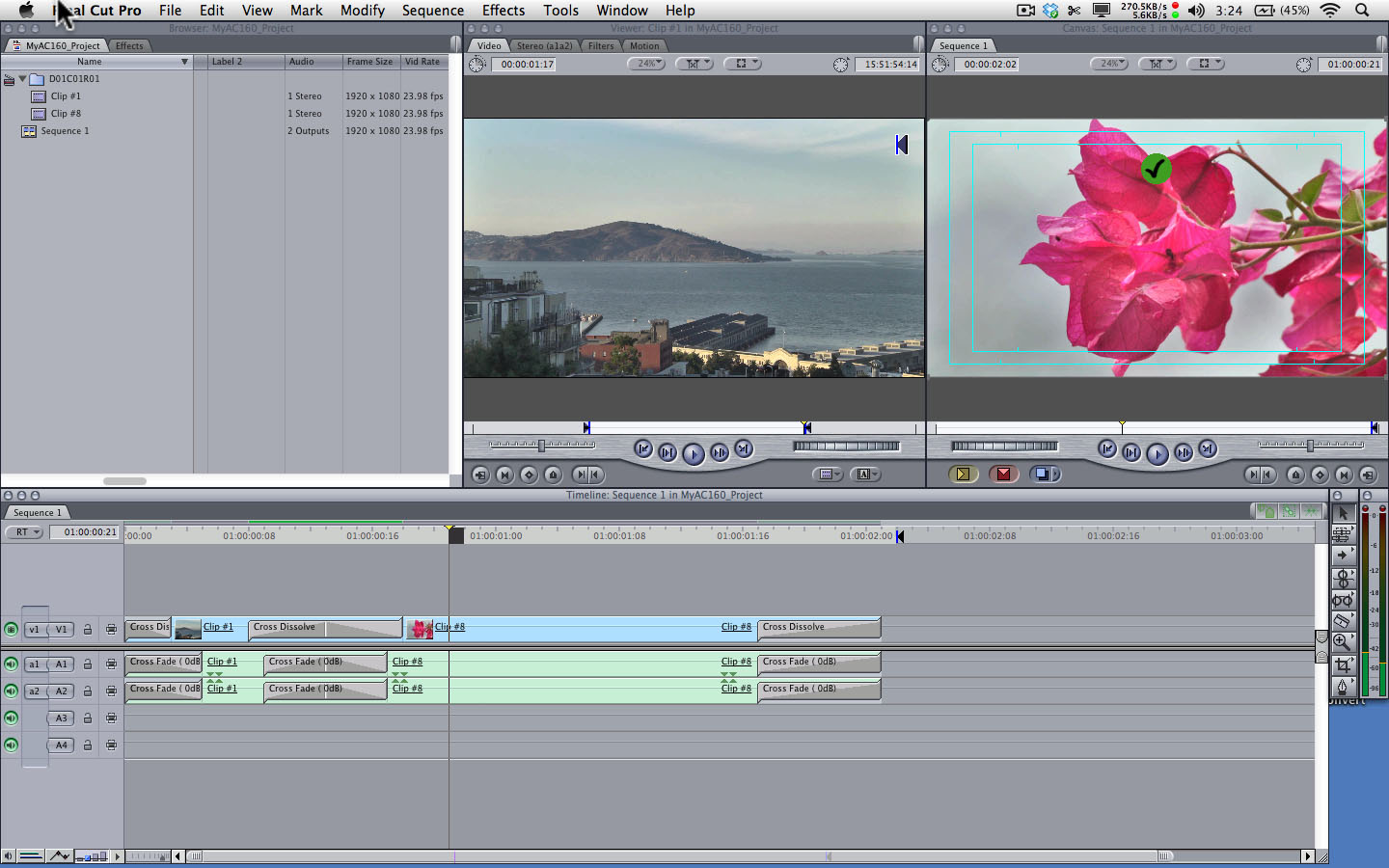
There are many different kinds of editing software out there. The editing software I've been trained on is Final Cut Pro 7 by Apple. It is a non-linear video editing software that allows an editor to transfer video onto a hard drive and then edit and export it into various formats.


Final Cut Pro 7 timeline in standard set-up.

In June 2011, Apple released Final Cut Pro X. It wasn't an update of the most recent edition, Final Cut Pro 7, but rather a re-visioned software. Its release was met with some controversy as many important features that editors used in Final Cut Pro 7 were not present at all in Final Cut Pro X. Even its design made users angry because it was somewhat modeled after iMovie, which is not by any means a professional editing suite. iMovie is essentially the Windows Movie Maker for Mac computers.

<----Final Cut Pro X  
iMovie---->


Editors have found many things wrong with Final Cut Pro X. It is not compatible with projects that were edited on previous editions of Final Cut Pro. Any project that I've edited on FCP 7 would not open on FCP X. There is no multi-camera editing. The timeline is much more difficult to work with. The list of things wrong with and/or missing from it goes on and on.

However, since last summer, Apple has given FCP X a couple of updates. The latest update, 10.0.3 has brought back some of those missing features, such as multi-camera editing and better control of the "chroma-keying" feature that is used when editing green screen shots.

The release of Final Cut Pro X put something of a damper on Apple's reputation as a provider of high-end editing software, but if future updates bring back the features that were cut, or makes them more accessible, perhaps the company will gain back some respect in that field.

Sunday, March 25, 2012

Introduction

Welcome to The Editing Suite, the blog about the various editing techniques in the film industry. This blog is a source of information for budding film editors, whether amateur film enthusiasts or film students. It will give technological insight into the mediums of editing and the techniques that come with them.

First of all, film can come in two mediums: physical reels of film and digital film, or video.

Film Reels


This is where it all began: the reel of film. Editing actual film was done with a device called a splicer. The developed film is held on a spool connected to a viewer, which is used to view the film and determine where to make cuts. With the splicer, the editor attaches the film to it, using the sprocket holes punched along the sides and then uses the attached knife to cut it. The splicer may come with a roll of special tape that is laid across the separation between two pieces of film which is pressed down by the top of the splicer to make it even.


A film splicer.

Digital Film

Today, digital film can be uploaded into an editing software on a computer, such as Apple's Final Cut Pro or Adobe Premiere. The film is brought onto a "timeline" where with a few clicks and keystrokes, scenes are cut and spliced together.

When it comes to editing, a film goes through several transitional cuts before reaching the final cut.

Final Cut Pro timeline


Assembly/Rough Cut


The assembly or rough cut is essentially the "first draft" of a film. The editor sits down with all of the collected footage and puts it together in a general assembly, laying the shots out in the order that they go.

From there, the editor refines it, trimming it down until it reaches the final cut.

Director's Cut

A director's cut is achieved when the director collaborates with the editor, in order for the film to be edited to depict the director's vision.

Final Cut


This is the completed version of the film that audiences see.


***

There are also various editing techniques that are used to move the story of a film, whether technical or stylistic.

Continuity Editing

This is the editing standard for narrative films. It moves the story of the film according to the plot. Continuity editing is part of the "Classical Hollywood Style" of filmmaking. It utilizes establishing shots to establish locations in the story, shot-reverse-shot to feature the back and forth dialogue between characters, and the 180 degree rule, which ensures that characters don't end up changing places, confusing the audience as to where they are in that space.

Montage

The montage is a series of shots that are edited together to condense the narrative, to keep the story of the film moving.

Jump Cut

This technique takes place during a single scene, where small chunks of the scene are cut out, breaking continuity. It is often used for dramatic effect.

Cutaway

This technique involves overlaying a separate scene with another scene. One scene "cuts away" to another.

Cross Cut

This technique is used to show two actions occurring at the same time, but in entirely different locations, such as two people talking to one another on the phone.

Graphic Match

This technique is used to keep continuity between two shots by matching the end and beginning of the two shots graphically.

Cutting On Action

This technique involves cutting from one shot to another shot from a different angle that matches the action of the first shot.


These are just a few of the basic editing techniques that exist.